

















扫码参与新品0元试用
晒单、顶楼豪礼等你拿

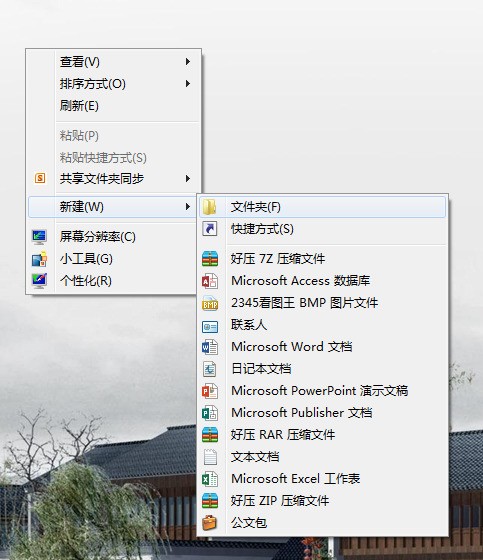
安装了office 2010 右键新建菜单里却没有word ppt 等
将下面的代码复制到一个文本文档,然后将扩展名改为.reg,如果没有显示扩展名,需要在文件夹选项里去修改一下。
这是添加word的
windows registry editor version 5.00
[hkey_classes_root.doc]
@="word.document.8"
"content type"="application/msword"
[hkey_classes_root.docopenwithlist]
[hkey_classes_root.docopenwithlistwordpad.exe]
@=""
[hkey_classes_root.docpersistenthandler]
@="{98de59a0-d175-11cd-a7bd-00006b827d94}"
[hkey_classes_root.docshellnew]
[hkey_classes_root.docword.document.6]
[hkey_classes_root.docword.document.6shellnew]
"filename"="winword.doc"
[hkey_classes_root.docword.document.8]
[hkey_classes_root.docword.document.8shellnew]
"filename"="winword8.doc"
[hkey_classes_root.docworddocument]
[hkey_classes_root.docworddocumentshellnew]
"filename"="winword2.doc"
[hkey_classes_root.docwordpad.document.1]
[hkey_classes_root.docwordpad.document.1shellnew]
"nullfile"=""
这是excel的
windows registry editor version 5.00
[hkey_classes_root.xls]
"content type"="application/vnd.ms-excel"
@="excel.sheet.8"
[hkey_classes_root.xlsexcel.sheet.5]
[hkey_classes_root.xlsexcel.sheet.5shellnew]
"filename"="excel.xls"
[hkey_classes_root.xlsexcel.sheet.8]
@=""
[hkey_classes_root.xlsexcel.sheet.8shellnew]
"filename"="excel9.xls"
[hkey_classes_root.xlsexcelworksheet]
[hkey_classes_root.xlsexcelworksheetshellnew]
"filename"="excel4.xls"
[hkey_classes_root.xlspersistenthandler]
@="{98de59a0-d175-11cd-a7bd-00006b827d94}"
|
|
扫码参与新品0元试用
晒单、顶楼豪礼等你拿